
How to Make a Reel from Photos on iPhone
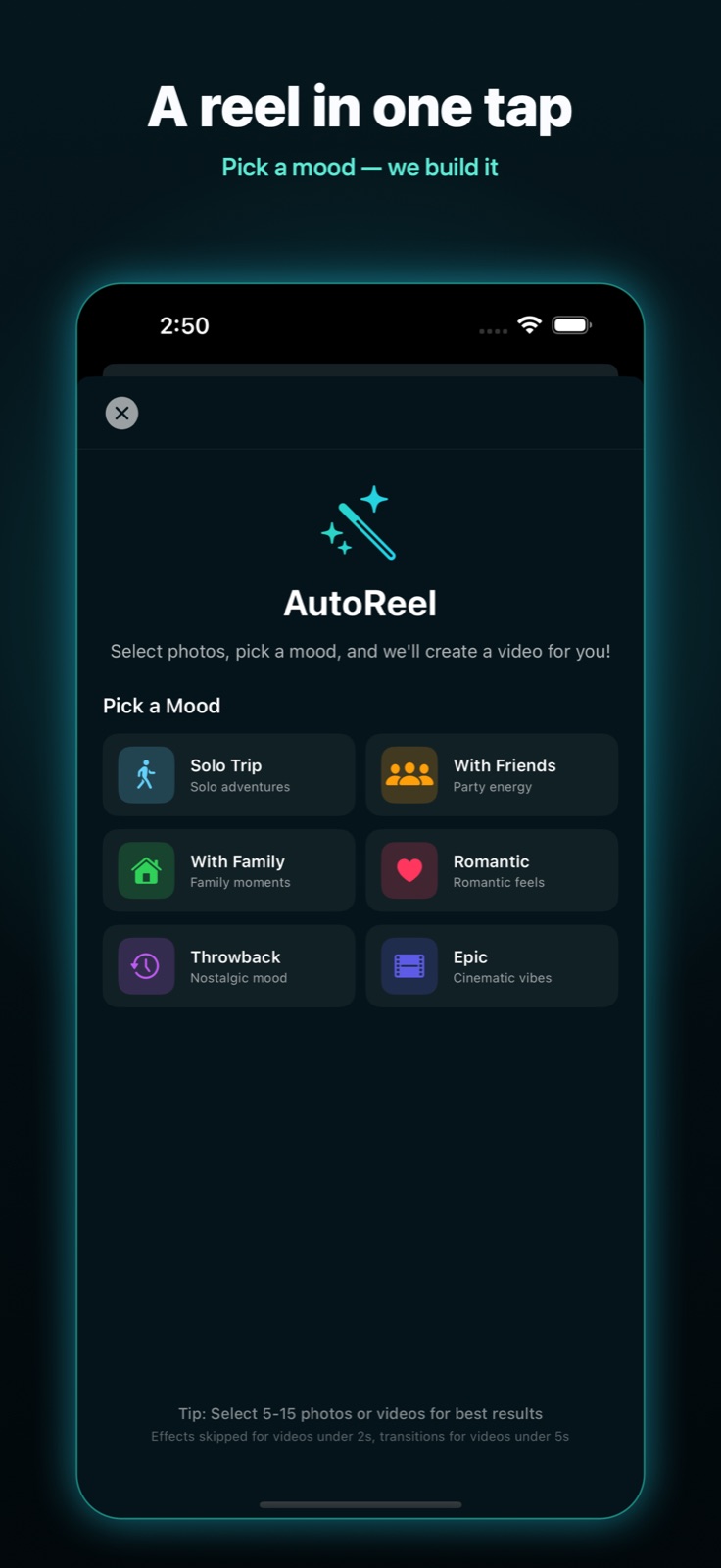
You have a camera roll full of moments from a trip, an event, or a weekend, and you want a reel you can post today. You do not need to learn a timeline or sit through a tutorial. On iPhone, the fastest path from photos to a finished, music-synced video is a feature called AutoReel.
Here is how to do it in a few taps, plus a few tips to make the result look intentional rather than automatic.
The fast way: AutoReel
AutoReel picks the pacing, transitions, and music for you, then hands you a finished reel you can post or keep editing. The whole flow takes about a minute.
- Open EditorPro and tap Auto Reel on the start screen.
- Pick a mood that matches your footage: Solo Trip, With Friends, With Family, Romantic, Throwback, or Epic. The mood sets the music and the color look.
- Select your photos and clips. Three or more works best, and you can mix photos with short videos.
- Let it build. EditorPro adds Ken Burns motion to your photos, matches transitions to the beat, and lays in a soundtrack that fits the mood.
- Tap Use This Reel to drop it onto the timeline, or Regenerate if you want a different take.
That is the entire process. If you only need a quick, shareable reel, you can stop here and export.
Want more control?
Once the reel is on the timeline, every part of it is editable. You do not have to redo anything by hand if you only want a small change. The quickest way to adjust it is to ask the built-in assistant in plain words, for example "make this cinematic," "switch to vertical," or "speed this up." It applies the edit for you.
If you prefer to do it yourself, the manual tools are all there too: trim and split clips, swap the filter, change a transition, adjust the music volume, or add a text overlay.
Tips for a reel that stands out
- Lead with your strongest shot. The first half-second decides whether someone keeps watching, so put your best frame first.
- Match the mood to the music. A Throwback set with upbeat party music feels off. Let the mood do the matching for you.
- Go vertical for Reels and TikTok. Use a 9:16 aspect ratio so your video fills the screen instead of sitting in a letterbox.
- Keep it short. A tight 15 to 30 second reel almost always outperforms a long one.
When you are happy with it, export in up to 4K and share straight to your photo library or your favorite app. Your photos and videos never leave your device.
Make your first reel in minutes
EditorPro turns your photos into a finished, music-synced reel with one tap. Free to download, made for iPhone.
Download on the App Store